

When Is the Best Time to Stargaze Tonight?
The best time to stargaze isn't always 'when it gets dark.' Learn how to find the ideal viewing window by checking cloud trends, moon timing, and hour-by-hour forecasts for your location.
Stargazing conditions change by the hour. Starglow's scrollable timeline grid shows you cloud coverage, visibility, and viewing quality for every hour of the night — so you can plan the perfect observing window.
Download Starglow Free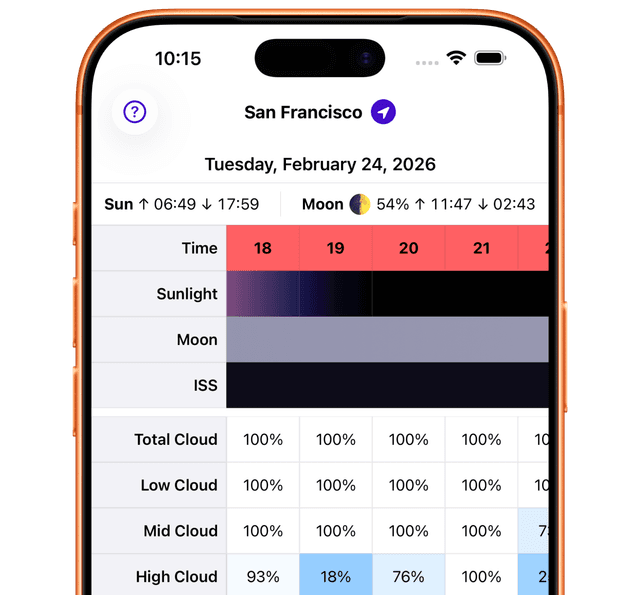
A clear sky at 9 PM doesn't guarantee clear skies at midnight. Weather systems move, clouds form and dissipate, and atmospheric conditions shift throughout the night. That's why a snapshot forecast isn't enough — you need to see how conditions evolve hour by hour to plan the best stargazing session.
Starglow's timeline view solves this by laying out every relevant metric across the entire night in a single, scrollable grid. Instead of checking back repeatedly or guessing when clouds might clear, you can see the full picture at once and choose your observing window with confidence.
The timeline grid packs a lot of information into an easy-to-scan format. Each column represents one hour, and each row tracks a different metric:
The top rows show cloud coverage at each altitude level — total, high, mid, and low. Each cell is color-coded green, amber, or red based on how favorable that hour is for stargazing. You can quickly scan across to find stretches of green — those are your prime observing windows.
The timeline marks key celestial events: when the Sun sets and rises (defining your available dark window), when the Moon rises and sets (affecting sky brightness), and when the ISS is visible overhead. These markers help you plan around natural light conditions.
An overall viewing quality score combines all atmospheric factors into a single color-coded rating for each hour. This is the fastest way to identify the best time to head outside — scan for green hours and you're set.
The best stargazing sessions start with a plan. Here's a simple workflow using the timeline:
With Starglow's timeline, you spend less time guessing and more time observing. Every clear hour is accounted for, and you'll always know the best time to look up.
The timeline is a scrollable hour-by-hour grid that displays multiple stargazing metrics for each hour of the night. You can see cloud coverage (total, high, mid, low), visibility conditions, ISS pass times, sun and moon positions, and an overall viewing quality rating — all laid out chronologically so you can quickly identify the best windows for observing.
The best time to stargaze isn't always 'when it gets dark.' Learn how to find the ideal viewing window by checking cloud trends, moon timing, and hour-by-hour forecasts for your location.

A stargazing forecast is more than just 'clear or cloudy.' Learn how to interpret cloud layers, visibility data, and hourly conditions to pick the perfect window for observing the night sky.
